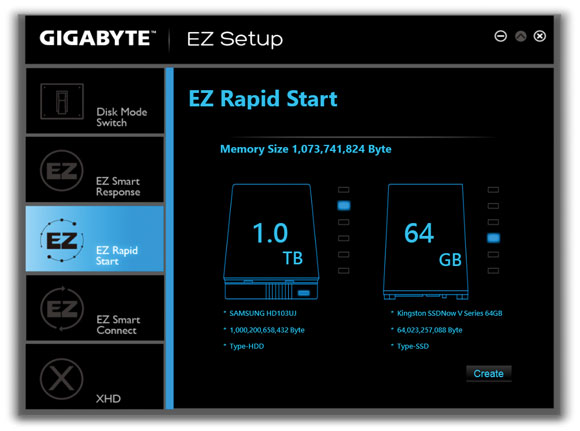
EZ Rapid Start
A. System Requirements
1. |
Intel® Rapid Start Technology enabled in BIOS Setup |
2. |
An SSD with size larger than the total system memory |
3. |
Windows 7 with SP1/Windows 8/Windows 8.1 |
4. |
AHCI/RAID mode supported (please note if the SSD has been assigned as a member of a RAID array, it
cannot be used to set up and Intel® Rapid Start store partition); IDE mode not supported(Note) |
|
| |
|
B. Using EZ Rapid Start |
Select EZ Rapid Start and click Create. Then install the Intel® Rapid Start Technology utility and restart your
computer to complete.
To disable this function, click Delete. |
|
| |
|
|
• |
The default compressed space is the system memory size plus 2 GB. For example, if the system
memory size is 8 GB, the default compressed space is 8 GB plus 2 GB, so the SSD capacity will
decrease by 10 GB. If EZ Rapid Start is disabled, the decreased 10 GB will be returned to the SSD. |
• |
If you want to upgrade your system memory, disable EZ Rapid Start first and re-install it to ensure
it can work normally. |
|
| |
|
(Note) |
If the motherboard Chipset supports RAID, EZ Rapid Start will force the Intel® SATA controllers into
RAID mode. If not, the Intel® SATA controllers will be forced into AHCI mode. |
|
|